Home / Workflows / Floor plan to Meta Quest VR
Workflow · VR & LiDARWalk a 2D floor plan in VR on Meta Quest 3
Extruda turns a 2D floor plan, or a phone LiDAR room scan, into a 3D model you can walk through in the browser: upload the plan, approve the drawing the AI reads from it in about a minute or two, press Walk through, and on a Meta Quest 3 press Step inside to stand in the rooms at full size. No app install, no CAD license.
The pipeline
- Bring the plan in. On the web, upload a PNG, JPG or WebP image, a one-page PDF or a DXF (30 MB). On a Pro iPhone or iPad, Scan this room walks the room with LiDAR and Apple RoomPlan, confirms what the scanner guessed (room names, door types) and lets you place what it missed, then uploads the scan as an editable drawing whose dimensions come from the scan.
- Approve the drawing. Check it against the original, or the scan, then approve. Extruda builds the 3D model from the drawing, and the model follows every edit you make in 2D.
- Walk through in the browser. In the 3D studio press Walk through. Drag to look, move with
W A S Dor the arrow keys, and jump between rooms with the room bar (for example Entrance 1/17) or the floor map. The play button starts a guided tour; Cinematic plays an automated film; Director mode sets the order, pace and shots. - Step inside in VR. Open the plan in the browser on a Meta Quest 3, or on a supported phone placed in a Cardboard-style viewer. A Step inside button appears; press it to stand in the model at full size. The button does not appear on desktops, or on phones and tablets that cannot run VR in the browser.
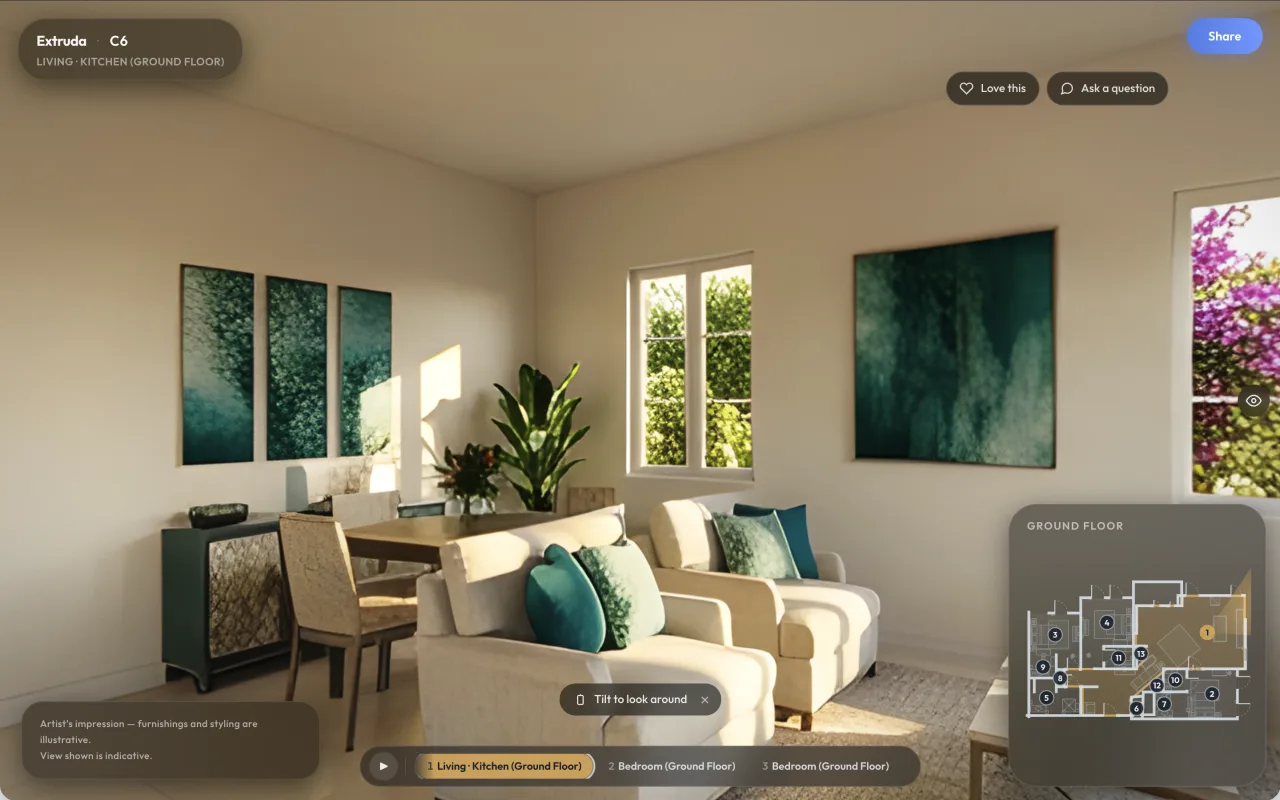
- Optional: photoreal tour. On Home and above, generate a 360° tour: a Standard tour in a few minutes, a Studio Tour (real materials, one light solve) in about 30 to 60 minutes. On a LiDAR-scanned plan, Pro and above can render a Scan-True Tour that shows "Dimensions from LiDAR scan" when every room passes the check.
Technical specifications
| Item | Specification |
|---|---|
| Inputs | PNG, JPG, WebP, one-page PDF or DXF (30 MB) on the web; photo, sketch or LiDAR room scan in the iPhone app. |
| LiDAR scan | Pro iPhone or Pro iPad with LiDAR; Apple RoomPlan. Every plan, including Free. Result: walls, doors and windows measured from the scan; no scale to guess. Not a survey; heights are standard values. |
| Walk-through | Real-time 3D in the browser at eye height. WASD / arrow keys, room bar, floor map, guided tour, Cinematic, Director mode. Every plan, including Free. |
| VR | Step inside on a Meta Quest 3 in the headset's browser, or on a supported phone in a Cardboard-style viewer. Full-size, standing in the model. Not shown on desktops. |
| Looks while walking | Realistic or Clay, light control, furniture toggle. |
| 360° tours | Standard: a few minutes, one photoreal panorama per room. Studio Tour and Scan-True: about 30 to 60 minutes. Home and above; Scan-True on Pro with a LiDAR-scanned plan. Allowances per month: Home 10 tours and 2 Studio Tours; Pro 30 and 10. |
| Your own VR pipeline | Export GLB (materials and textures), glTF or OBJ (geometry only) on Pro and above; every floor or one floor, furnished or bare shell. FBX not offered; convert in Blender. |
| Multi-storey | Up to four storeys stacked into one building; a whole-building tour uses one tour per floor. |
| Plan | Walk-through and VR: every plan. Tours: Home ($58.33/month billed annually, $69.99 monthly) and above. Exports: Pro ($191.67/month annually, $229.99 monthly) and above. |
Stand inside the plan before anything is built
Upload a plan or scan a room, approve the drawing, and walk the model in the browser or at full size on a Quest 3.
Get early access →Honest scope
- The model is extruded from a 2D drawing. Ceiling and door heights are standard values unless you set them. A LiDAR scan measures the walls, doors and windows, but it is not a survey, and a very complex room outline may be simplified.
- Photoreal tours are illustrations of the space, not photographs: furnishings and styling are illustrative, and window views are not the real surroundings.
- VR runs in the headset's browser. Extruda does not ship a Quest app.
Frequently asked questions
Can I walk through a 2D floor plan in VR on a Meta Quest 3?
Yes. Extruda builds a 3D model from the approved drawing. Open the plan in the Quest 3's browser, press Walk through, then Step inside to stand in the model at full size. No app install is needed. The button also appears on a supported phone placed in a Cardboard-style viewer; it does not appear on desktops.
Does walking through the model cost extra?
No. Opening, orbiting, measuring and walking through the 3D model is on every plan, including Free. Photoreal 360° tours, films and Studio Tours are separate renders on Home and above.
Can I turn a phone LiDAR room scan into an editable 3D model and CAD files?
Yes. The iPhone app's Scan this room uses the LiDAR sensor and Apple RoomPlan on a Pro iPhone or iPad. The scan becomes an editable drawing whose dimensions come from the scan, so there is no scale to guess. From there you can walk it in 3D on any plan, and export DXF, IFC, .blend, glTF/GLB and OBJ on Pro and above. A scan is not a survey: heights are standard values.
What is the difference between the walk-through and a 360° tour?
The walk-through is the real-time 3D model in the browser, on every plan. A 360° tour is a photoreal panorama of every room rendered from the drawing: a Standard tour takes a few minutes, a Studio Tour or Scan-True Tour about 30 to 60 minutes. Tours need Home or above; Scan-True needs Pro and a LiDAR-scanned plan.
Can I use the model in my own VR pipeline?
Yes. On Pro and above, export GLB (one file with materials and textures) or OBJ (geometry only) and load it in Unity, Unreal or any WebXR viewer. FBX is not offered; convert from OBJ or GLB in Blender.